


 Download
 Facebook
 Twitter
 Google+
Trello for Alfred v0.9
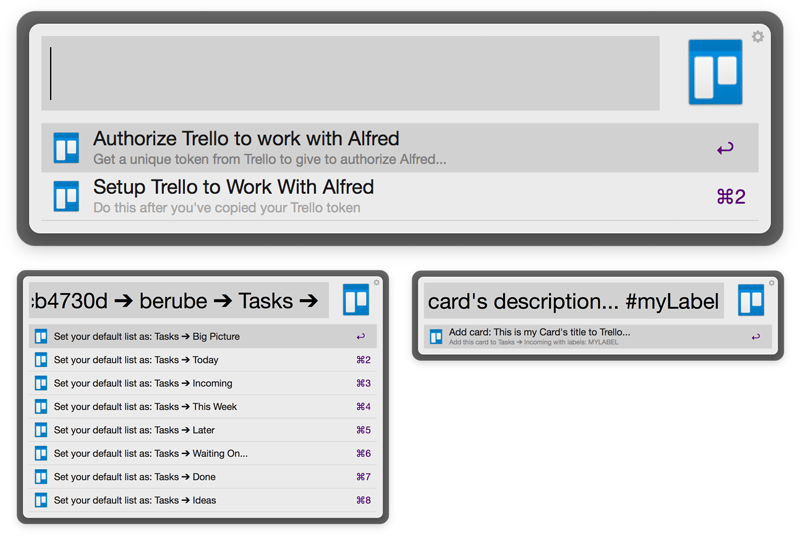
Description: Trello Workflow for the Mac OS app Alfred v2 that allows you to quickly create new cards with labels on your Trello board lists.
Version: 0.9
Installation & Setup
- Double click on the trello.alfredworkfow file to have Alfred v2 automatically install this workflow
-
Open Alfred and enter the trigger: trello
- Select Authorize Trello
- This will open a browser window and ask for permission to access your Trello account
- Once you approve the permissions a token will be displayed, copy this to your clipboard
-
Open Alfred and enter the trigger: trello again
- Select Setup Trello
-
Follow the on screen instructions:
- Paste your Trello authorization token
- Enter in your Trello username
- Select which Trello Board you would like to use
- Select which list on your board you would like cards to be added to
- Save!
-
To change your Trello settings once they are already set, you can access the Authorize and Setup options with:
trello:authtrello:setup
Usage
-
trello
card_title;description#label#another-label!@listName-
Required:
card_title
-
Optional:
-
description-
To end the card title and
start typing the
description, use the
;character
-
To end the card title and
start typing the
description, use the
-
#labels-
To add labels to the card,
simple prefix the label name
with a
#character
-
To add labels to the card,
simple prefix the label name
with a
-
!@listName- Add the card to a list other than your default list
-
-
Example Usage:
-
trello This is my Card's
                                                  title; This is my card's
                                                  description... #myLabel
                                                  #myOtherLabel
                                                  !@mySpecificList
-
-
Credits
This workflow is based on this other Trello Workflow from MikoMagni. Trello API wrapper and PHP INI Builder are also used.
